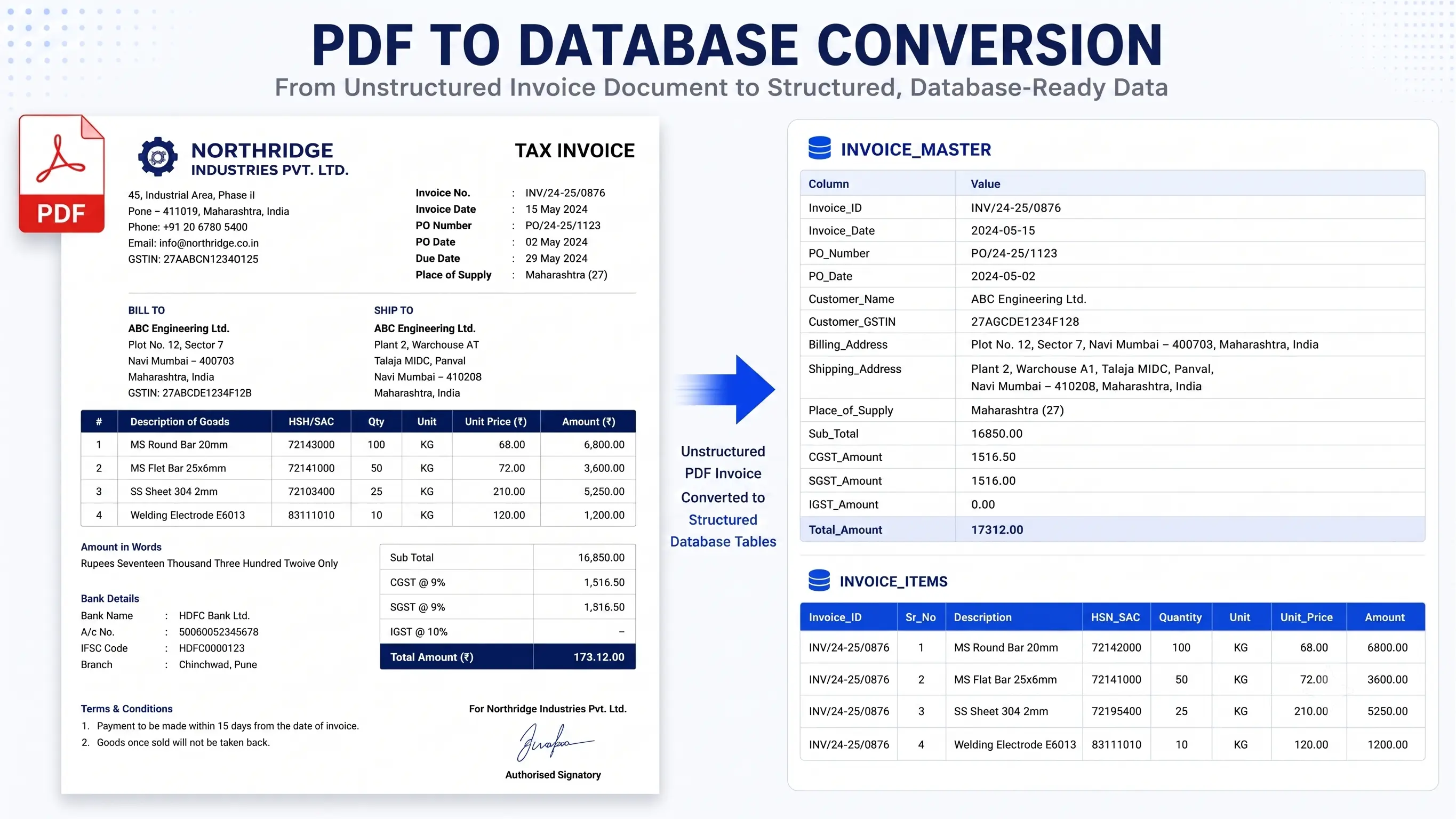
PDF to Database Conversion: A Step-by-Step Guide
Businesses generate enormous amounts of information every day, but much of it remains trapped inside PDF documents. Invoices, purchase orders, customer records, engineering reports, financial statements, contracts, inventory lists, and historical archives often exist only as PDF files that are difficult to search, analyze, or integrate into modern software. While PDFs are excellent for preserving document formatting, they are not designed to function as databases. As organizations adopt ERP systems, CRM platforms, analytics tools, and cloud applications, converting PDF documents into structured database records becomes an essential part of digital transformation. A successful conversion project involves far more than simply extracting text. It requires understanding document layouts, identifying meaningful information, validating extracted values, handling exceptions, and preparing clean data that can be trusted inside business applications.
Need help extracting valuable business records trapped inside legacy documents?
Historical PDFs, scanned documents, reports, and spreadsheets contain information your business depends on—but it's difficult to search and even harder to analyze. We convert legacy documents into accurate, database-ready datasets, making your data instantly searchable, easier to manage, and ready for modern business applications.
Why businesses convert PDFs into databases
Many organizations rely on PDFs because they are portable, easy to share, and preserve the original appearance of business documents. The problem begins when information inside thousands or even millions of PDFs needs to be searched, analyzed, or imported into another system. Employees often spend countless hours opening files one by one, copying information manually, and entering it into spreadsheets or databases. Besides being slow, manual processing increases the risk of typing mistakes and inconsistent data. Converting PDF documents into structured database records allows businesses to automate searches, generate reports instantly, integrate with ERP and CRM systems, improve customer service, and unlock valuable historical information that would otherwise remain inaccessible.
Step 1: Understand the documents before extracting anything
One of the biggest mistakes businesses make is assuming every PDF follows the same layout. In reality, documents collected over several years often come from different departments, software versions, or third-party vendors. Some PDFs are digitally generated, while others are scanned copies of paper documents. Before any extraction begins, it is important to review a representative sample of files and identify the various document formats that exist. Understanding how information is organized helps determine the best extraction strategy and avoids unexpected problems later in the project.
Questions worth answering during the assessment
- Are the PDFs digitally generated or scanned images?
- Do all documents share the same layout?
- Which fields are required in the final database?
- How many different document templates exist?
- Are there handwritten notes or stamps that may affect extraction?
- Will the data be imported into an ERP, CRM, SQL database, or another application?
- Are there business rules that determine how fields should be interpreted?
- How will the converted data be validated before import?
Step 2: Classify different document types
Large organizations rarely store only one type of PDF. A single project may include invoices, shipping documents, financial reports, contracts, employee records, maintenance logs, engineering drawings, and customer forms. Each document category follows its own structure and contains different business information. Grouping similar documents before extraction allows each template to be processed using rules specifically designed for that layout. This significantly improves extraction accuracy while reducing manual corrections.
Step 3: Extract the required information
Once the document types have been identified, the next step is extracting the information needed by the destination database. For digitally generated PDFs, text can usually be extracted directly while preserving character accuracy. Scanned PDFs require Optical Character Recognition (OCR) before text becomes machine-readable. During this stage, only relevant business information should be collected. Instead of extracting every word on every page, the focus should remain on fields that provide value to the business, such as customer names, invoice numbers, dates, product details, quantities, balances, addresses, and reference numbers.
Different extraction methods depending on the document
Not every PDF requires the same extraction technique. Some documents contain perfectly structured tables that can be identified automatically. Others rely on text positioning, while many scanned documents require OCR combined with post-processing rules. Highly complex reports sometimes require custom parsing logic that understands page layouts rather than simply reading text line by line. Selecting the appropriate extraction approach based on document structure produces significantly better results than applying a single method to every file.
Step 4: Clean and standardize the extracted data
Extracting information from PDF files is only the beginning of the conversion process. Raw data often contains inconsistencies that have accumulated over many years. Customer names may appear in different formats, dates may follow multiple standards, currencies may use different symbols, and product descriptions may contain unnecessary spaces or abbreviations. Cleaning the extracted information before importing it into the database ensures every record follows the same structure. This not only improves reporting accuracy but also prevents future applications from rejecting records because of inconsistent formatting.
Common data cleansing activities
- Remove duplicate records created across multiple document versions.
- Convert dates into a single standardized format.
- Standardize currencies, decimal separators, and number formats.
- Trim unnecessary spaces and hidden characters.
- Correct common OCR recognition errors.
- Normalize customer names, product codes, and department names.
- Separate combined fields into individual database columns.
- Ensure mandatory fields contain valid values before import.
Step 5: Validate the extracted information
A database is only as reliable as the information stored inside it. Before any records are imported, every extracted value should be verified against the original PDF wherever possible. Validation helps identify missing information, incorrect character recognition, misplaced columns, and unexpected formatting issues. Businesses often perform automated validation on every record while manually reviewing a smaller sample of documents to ensure the extraction rules are working correctly. This combination provides confidence that the converted dataset accurately represents the original documents.
Examples of validation checks
- Compare the total number of converted records with the original documents.
- Verify invoice totals against calculated line-item amounts.
- Confirm mandatory fields are never left empty.
- Check that dates fall within expected business periods.
- Validate customer IDs and product codes against existing master data.
- Identify duplicate primary keys before database import.
- Ensure numeric values contain valid decimal precision.
- Review random samples against the original PDFs.
Step 6: Map the data to the destination database
The structure of a PDF rarely matches the structure of the destination database. A single line within a document may contain multiple pieces of information that need to be separated into individual database fields. Likewise, information spread across several pages may need to be combined into a single record. Field mapping defines exactly where every extracted value belongs inside the destination system. Proper mapping prevents data from being stored in incorrect columns and ensures business applications can immediately use the imported information.
Field mapping is more than matching column names
Many business owners assume field mapping simply means copying one column into another. In reality, mapping often includes transforming values, splitting combined fields, calculating new values, converting measurement units, and applying business rules that did not exist in the original documents. For example, an invoice status printed as 'Paid in Full' may need to become a numeric status code inside the destination database. Product descriptions may also require separation into product family, model number, and size before they can be stored efficiently.
Step 7: Handle exceptions instead of ignoring them
No large PDF conversion project is completely uniform. Some documents contain missing pages, damaged scans, handwritten corrections, unusual layouts, or historical formats that differ from modern templates. Attempting to force every document through the same extraction process often creates inaccurate data. A better approach is to identify exceptional documents early and process them using dedicated rules or manual review. Handling exceptions separately protects the quality of the overall database while avoiding unnecessary delays for documents that can be processed automatically.
Typical exceptions found during PDF conversion
- Scanned pages with poor image quality.
- Rotated or upside-down documents.
- Handwritten annotations added after printing.
- Documents containing multiple languages.
- Tables spanning several pages.
- Missing headers or incomplete records.
- Historical templates no longer used by the business.
- Corrupted or partially damaged PDF files.
Step 8: Import the data into the database
Once the extracted information has been cleaned, validated, and mapped correctly, the final dataset is ready for import. Depending on business requirements, the destination may be a SQL database, cloud platform, ERP system, CRM application, data warehouse, or another enterprise solution. Importing should always be performed using controlled batches with detailed logging so that any unexpected issues can be traced and corrected without affecting the entire dataset. Keeping a backup of both the original PDFs and the converted records also provides a reliable audit trail for future reference.
Mistakes that often delay PDF conversion projects
Many conversion projects run over budget because organizations underestimate the complexity of their documents. They assume all PDFs share the same layout, overlook historical document variations, skip validation steps, or begin importing data before cleaning is complete. Another common mistake is focusing only on extracting text rather than producing structured, business-ready information. Successful projects treat PDF conversion as a complete data preparation process instead of a simple document extraction task.
Choosing the right conversion approach
There is no single solution that works for every PDF conversion project. The right approach depends on the type of documents, the quality of the source files, the amount of historical data, and the destination system. Small projects involving a few hundred documents can often be completed using existing extraction tools with minimal customization. Larger enterprise projects involving hundreds of thousands or even millions of PDFs usually require custom parsing rules, automated validation, OCR optimization, and scalable processing pipelines. Taking the time to evaluate the project before selecting a conversion strategy helps reduce costs and improves the overall quality of the final dataset.
When automation delivers the greatest value
Automation becomes increasingly valuable as document volumes grow. A team manually processing a few hundred PDFs may complete the work within days, but the same approach becomes impractical when millions of records need to be extracted. Automated conversion not only accelerates processing but also produces consistent results across every document. Once extraction rules have been tested and validated, the same logic can be applied repeatedly without the variations that naturally occur during manual data entry. Businesses also gain the ability to process future documents using the same workflow, reducing operational costs over the long term.
Security should be part of every conversion project
Many PDF documents contain confidential business information, including customer records, financial transactions, employee details, engineering specifications, or legal documents. Protecting this information should be considered from the beginning of the project rather than after the conversion has been completed. Secure file transfer, controlled access permissions, encrypted storage, audit logs, and careful handling of temporary working files help ensure sensitive information remains protected throughout the entire conversion process. Organizations operating in regulated industries should also verify that their data handling procedures comply with relevant legal and industry requirements.
How long does PDF to database conversion take?
The answer depends on several factors rather than simply the number of PDF files. Projects involving clean, digitally generated documents can often be completed much faster than projects containing low-quality scans, handwritten notes, or dozens of different layouts. The amount of validation, business rules, field mapping, and exception handling also affects the timeline. A well-planned project that begins with document analysis and a small pilot conversion usually finishes more efficiently than one that attempts to process every document immediately without understanding the source data.
Business benefits after the conversion is complete
- Find business records instantly instead of searching through thousands of PDFs.
- Import historical information into ERP, CRM, and accounting systems.
- Generate reports and dashboards using structured business data.
- Reduce manual data entry and associated human errors.
- Improve decision-making through searchable historical information.
- Create a single source of truth for business records.
- Support audits and compliance using validated digital data.
- Prepare historical documents for future automation and AI initiatives.
Frequently asked questions
- Can scanned PDFs be converted into a database? Yes. OCR technology can recognize text from scanned documents, followed by validation and data cleansing.
- Can tables inside PDFs be extracted accurately? Yes. Structured tables can usually be identified and converted into database rows with appropriate extraction rules.
- Can millions of PDF files be processed? Yes. Large-scale enterprise projects often use automated processing pipelines capable of handling millions of documents.
- Is manual verification still necessary? In most projects, yes. Automated validation should be combined with sample-based manual quality checks to ensure accuracy.
- Can converted data be imported directly into SQL, ERP, or CRM systems? Yes. Once the data has been cleaned, standardized, and mapped correctly, it can be prepared for import into most modern business applications.
Final thoughts
Converting PDF documents into a structured database is much more than extracting text from files. It is a carefully planned process that combines document analysis, intelligent extraction, data cleansing, validation, field mapping, and quality assurance to create information that businesses can trust. Whether the project involves a few thousand records or millions of historical documents, investing time in proper planning significantly reduces errors and improves long-term business value. Organizations that approach PDF conversion as part of a broader data quality initiative are better positioned to modernize their systems, improve operational efficiency, and unlock valuable information that has remained hidden inside documents for years.
Turn your documents into valuable business data.
From historical archives and scanned PDFs to invoices, engineering reports, and spreadsheets, we help businesses transform complex documents into structured, database-ready information with thorough validation and quality assurance. No matter the size of your project, we're ready to help.